'%20stroke='url(%23pc-grad)'%20stroke-width='3'%20stroke-linejoin='round'%20stroke-linecap='round'%20fill='none'%3e%3cpath%20d='M14%2012%20H46%20a8%208%200%200%201%208%208%20v14%20a8%208%200%200%201%20-8%208%20H36%20l-8%208%20v-8%20H14%20a8%208%200%200%201%20-8%20-8%20V20%20a8%208%200%200%201%208%20-8%20z'/%3e%3cpath%20d='M18%2022%20H42'%20/%3e%3cpath%20d='M18%2028%20H38'%20/%3e%3cpath%20d='M18%2034%20H34'%20/%3e%3c/g%3e%3cg%20fill='url(%23pc-grad)'%20filter='url(%23pc-glow)'%3e%3cpath%20d='M40%2038%20l10%2010%20-3%206%20-3%20-3%20-6%203%20z'%20opacity='0.95'/%3e%3ccircle%20cx='44'%20cy='49'%20r='1.5'%20fill='%230b0b14'/%3e%3c/g%3e%3c/svg%3e)
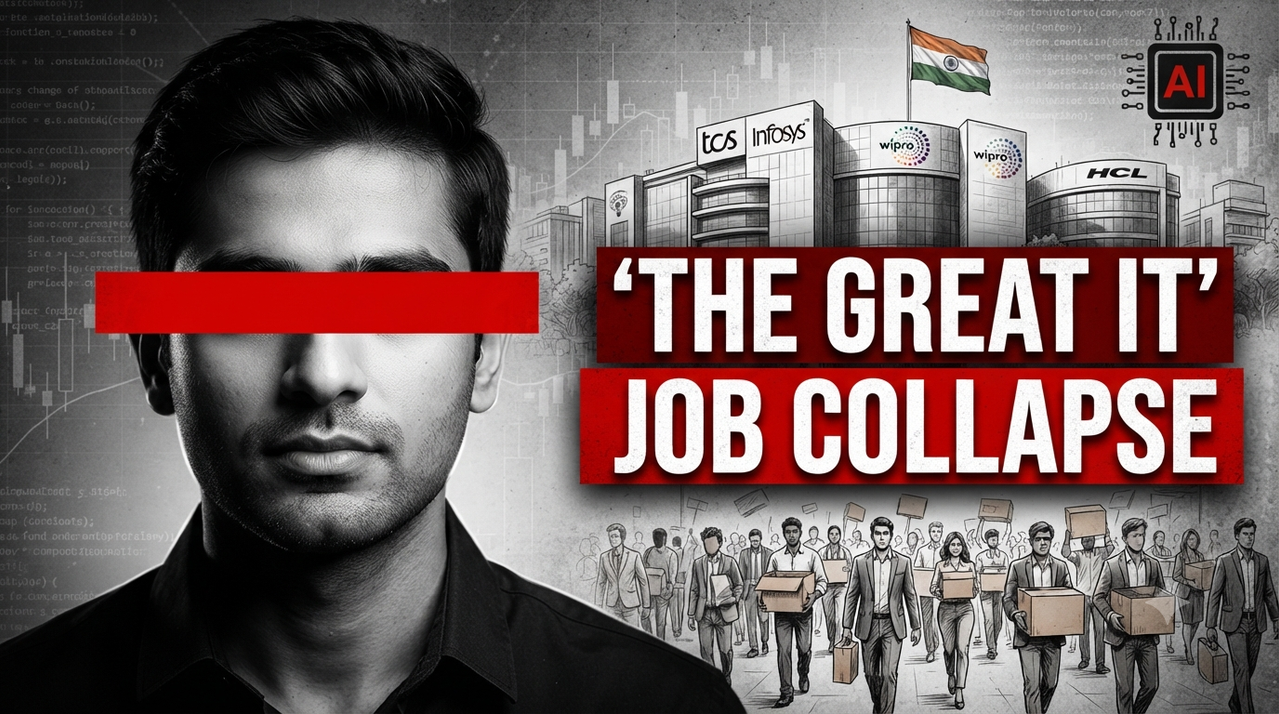
The Great IT Job Collapse News Report YouTube Thumbnail Prompt
Generate gritty news-style tech crisis thumbnails featuring monochrome cityscapes, red eye-redaction bars, and distressed headline text blocks.
30th
Customization Form: Please replace the bracketed items below with your own text and subject matter to generate a similar high-converting thumbnail.
Main Subject (Left): [INSERT YOUR FACE / MAIN SUBJECT HERE]
Subject Redacted Element: [KEEP THE RED STRIPE OVER EYES, OR REMOVE/CHANGE]
Main Headline (Right): [INSERT YOUR HEADLINE, e.g., THE GREAT IT]
Second Headline (Right): [INSERT YOUR SECOND LINE, e.g., JOB COLLAPSE]
Background City Elements: [INSERT YOUR BACKGROUND BUILDINGS, e.g., SPECIFIC TECH PARK LOGOS]
Background Flag: [INSERT YOUR COUNTRY FLAG, e.g., INDIAN FLAG]
Background Data: [KEEP THE STOCK MARKET/CODE DATA OVERLAY]
Small Red Icon Text: [INSERT SMALL ICON TEXT, e.g., AI]
Bottom Subject (Crowd): [INSERT YOUR CROWD/PEOPLE, e.g., CROWD OF LAID-OFF WORKERS]
Detailed Prompt (Copy and Paste this block):
A high-contrast, dramatic, photo-realistic YouTube thumbnail with a gritty, textured news report aesthetic. The overall composition and text placement must mirror the reference image.
Left Side: A monochrome portrait of [INSERT YOUR FACE AND UPPER BODY HERE] is on the left side of the frame. Crucially, a solid, horizontal, bright red bar is superimposed directly over the subject's eyes, matching the exact position and thickness as seen in the reference.
Right Side - Background Elements: The background is a desaturated, monochrome cityscape featuring detailed, realistic sketches of major tech campus buildings (e.g., TCS, Infosys, Wipro, HCL, as seen in the reference). The specific logos on these buildings are clear. The Indian flag is flying atop one of the buildings. A faint overlay of stock market data charts and lines of computer code covers the entire background texture.
Right Side - Headline Text (Crucial - Render with exact typography): To the right of the main subject, layered over the background elements, are two large, bold, distressed red text blocks. They must be stacked and aligned exactly as in the reference image.
Top Block: "[INSERT HEADLINE TEXT, e.g., THE GREAT IT]"
Bottom Block: "[INSERT SECONDARY HEADLINE TEXT, e.g., JOB COLLAPSE]"
Foreground Elements: In the bottom-right foreground, there is a detailed, monochrome sketch of a crowd of [INSERT YOUR CROWD, e.g., many diverse people walking away with cardboard boxes], suggesting mass layoffs.
Small Icon: In the top-right corner, near the flag, there is a small, square, monochrome circuit board icon with the red text "[INSERT SMALL ICON TEXT, e.g., AI]" inside it.
Style and Lighting: Dramatic, low-key studio lighting with strong contrast. Deep shadows and bright highlights. The red text and the red eye-bar should be highly saturated against the monochrome image.
Aspect Ratio: 16:9 (Standard YouTube). (Ignore the time stamp in the bottom right corner).
Try this prompt in
How to Use This Prompt
The Great IT Job Collapse News Report YouTube Thumbnail Prompt is a ready-to-use AI text prompt designed for youtube-thumbnail who want consistent, high-quality results without spending hours on trial and error. Generate gritty news-style tech crisis thumbnails featuring monochrome cityscapes, red eye-redaction bars, and distressed headline text blocks.
Use this prompt whenever you need reliable written output for youtube-thumbnail workflows — typical moments include client work, content production, classroom prep, and rapid iteration on ideas. Copy the full prompt, paste it into your preferred AI tool, and replace any bracketed placeholders with your own specifics (topic, brand, subject, or constraints).
For best results, give the model a clear context line before pasting, keep your replacements concrete (numbers, names, examples), and ask a short follow-up to refine tone or length. Pair it with the customization tips below to adapt it to your exact use case.
Example Output
Expect a structured, ready-to-use response covering it job collapse, tech layoffs, news thumbnail in a clear format you can paste straight into your workflow with only light edits.
Prompt Details
Customization Tips
- Replace placeholders with your actual it job collapse details for sharper, on-brand output.
- Set a target length ("respond in ~150 words" or "in 5 bullet points").
- Specify the audience reading level (beginner, expert, executive).
- Ask for the output in a specific format — table, JSON, Markdown, email.
- Add a tone instruction: friendly, formal, witty, persuasive.
- Chain a follow-up: "now rewrite for LinkedIn" or "make it 30% shorter".
- Constrain with examples — paste 1–2 samples of the style you want to match.
- Add a "do not" list to block common mistakes (no emojis, no fluff, no disclaimers).
Frequently Asked Questions
What is the "The Great IT Job Collapse News Report YouTube Thumbnail Prompt" prompt used for?
Generate gritty news-style tech crisis thumbnails featuring monochrome cityscapes, red eye-redaction bars, and distressed headline text blocks.
Which AI models work best with this prompt?
It works across all major models, but you'll get the strongest results from GPT-4o, Claude 3.5 Sonnet, Gemini 1.5 Pro.
Is this prompt free to use?
Yes. Every prompt on PromptCraft is free, requires no signup, and can be copied with one click for personal or commercial projects.
Can I edit the prompt?
Absolutely. Treat it as a starting template — swap in your topic, audience, and tone. See the customization tips above for proven tweaks.
Why is my output different from the example?
AI models are non-deterministic — the same prompt produces variations each run. Regenerate 2–3 times and pick the strongest result, or refine with a short follow-up instruction.