Local Business Promotional Flyer AI Prompts for Marketing
A ready-to-use AI image generation prompt for creating a professional local business promotional flyer in the marketing space. Copy, customize the bracketed details, and paste into Midjourney, DALL-E,
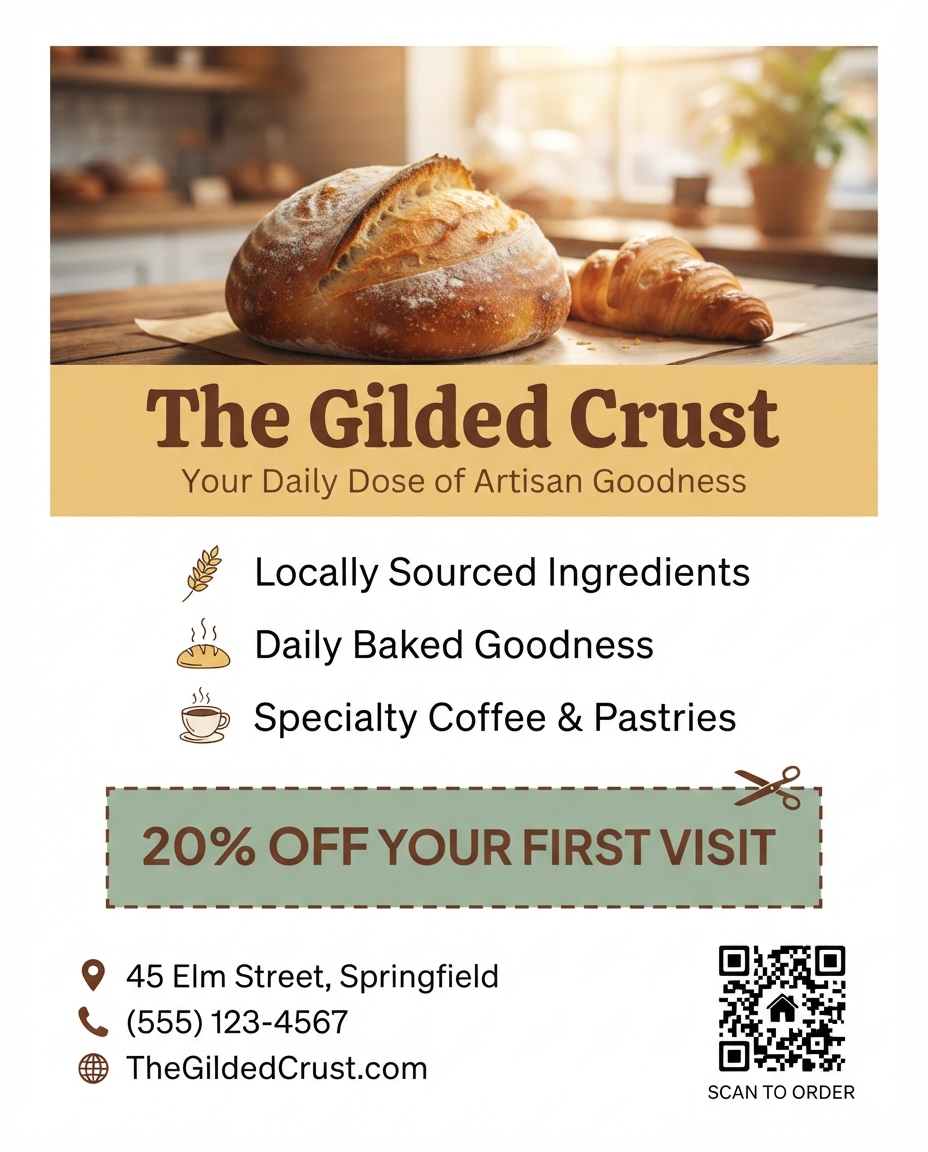
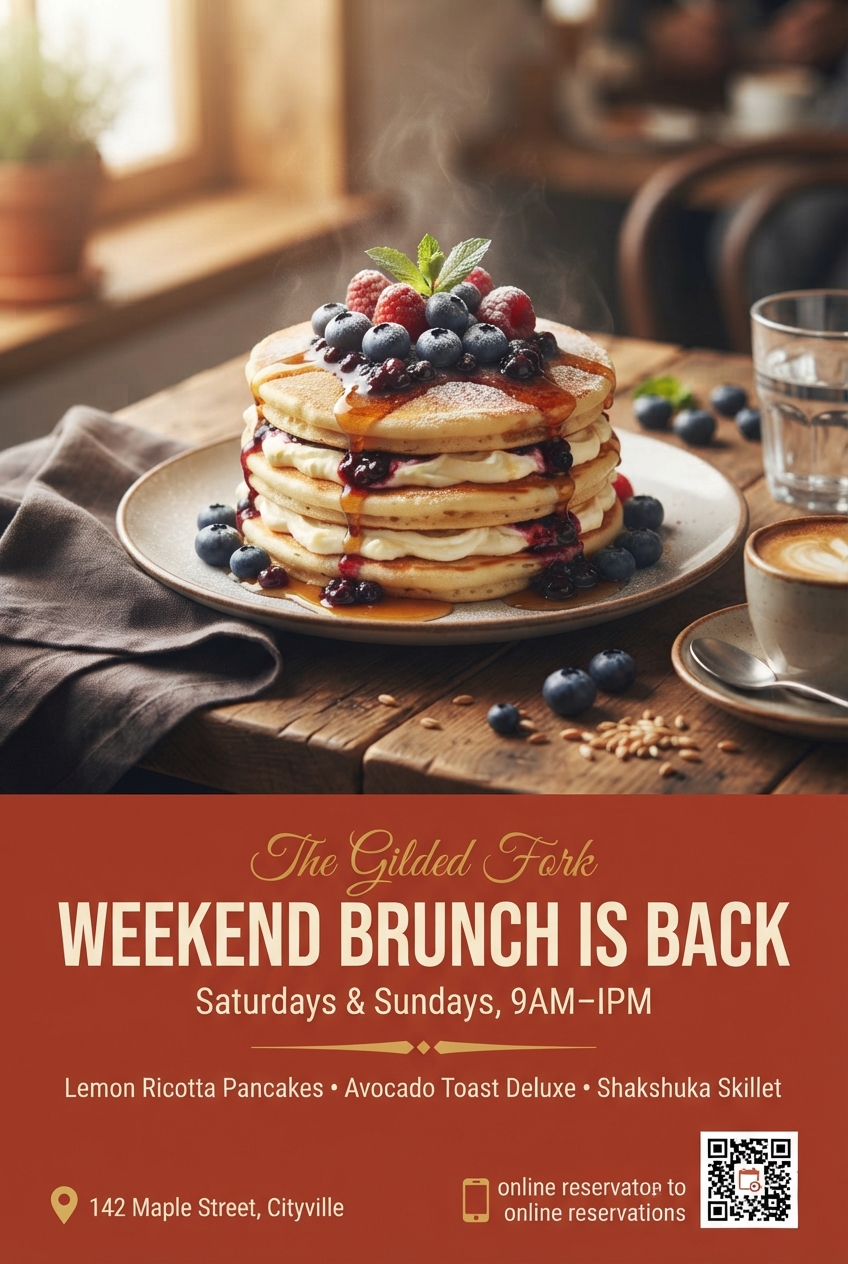
A clean, professional promotional flyer design, portrait 4:5 aspect ratio, for a local [BUSINESS TYPE, e.g., coffee shop, hair salon, gym] named "[BUSINESS NAME]". At the top third, place a warm, inviting photograph of the storefront or a signature product/service, such as [PHOTO SUBJECT, e.g., a latte with latte art, a stylist working on a client, a trainer coaching a class], shot with natural, flattering light and a shallow depth of field that softly blurs the background. Directly below the photo, overlay a solid color banner strip in the brand's primary color, [BRAND COLOR], containing the business name in large, friendly serif or rounded sans-serif lettering. Beneath the name, add a short tagline reading "[TAGLINE, e.g., Your Neighborhood Coffee Spot]" in a lighter, smaller font. In the middle section of the flyer, list three key selling points or services using simple icon-and-text pairs, such as a small icon followed by "[SERVICE 1]", another icon followed by "[SERVICE 2]", and a third icon followed by "[SERVICE 3]", arranged in a clean vertical list with consistent spacing. Below the list, feature a highlighted offer box with a dashed or solid border containing bold text reading "[OFFER, e.g., 20% OFF Your First Visit]" alongside a small coupon-scissors icon to suggest it can be cut out or shown at checkout. Near the bottom of the flyer, include a contact information block listing "[ADDRESS]", "[PHONE NUMBER]", and "[WEBSITE OR SOCIAL HANDLE]" in a neat, легible sans-serif font, alongside small icons for a location pin, phone, and globe or social media logo. Finish with a QR code placeholder in the bottom corner linking to the business's website or booking page. Use a warm, approachable color palette consistent with the brand identity, generous white space to avoid a cluttered feel, and a clear visual hierarchy guiding the eye from the photo down to the offer and finally the contact details. The overall style should feel trustworthy, community-oriented, and easy to scan within a few seconds, appropriate for printing and handing out locally or posting in a shop window. Aspect ratio 4:5, optimized for both print and social sharing.
Try this prompt in
How to Use This Prompt
Local Business Promotional Flyer AI Prompts for Marketing is a ready-to-use AI text prompt designed for marketers who want consistent, high-quality results without spending hours on trial and error. A ready-to-use AI image generation prompt for creating a professional local business promotional flyer in the marketing space. Copy, customize the bracketed details, and paste into Midjourney, DALL-E,
Use this prompt whenever you need reliable written output for marketers workflows — typical moments include client work, content production, classroom prep, and rapid iteration on ideas. Copy the full prompt, paste it into your preferred AI tool, and replace any bracketed placeholders with your own specifics (topic, brand, subject, or constraints).
For best results, give the model a clear context line before pasting, keep your replacements concrete (numbers, names, examples), and ask a short follow-up to refine tone or length. Pair it with the customization tips below to adapt it to your exact use case.
Example Output
Expect a structured, ready-to-use response covering ai prompts for marketing, local business promotional flyer, marketing design in a clear format you can paste straight into your workflow with only light edits.
Prompt Details
Customization Tips
- Replace placeholders with your actual ai prompts for marketing details for sharper, on-brand output.
- Set a target length ("respond in ~150 words" or "in 5 bullet points").
- Specify the audience reading level (beginner, expert, executive).
- Ask for the output in a specific format — table, JSON, Markdown, email.
- Add a tone instruction: friendly, formal, witty, persuasive.
- Chain a follow-up: "now rewrite for LinkedIn" or "make it 30% shorter".
- Constrain with examples — paste 1–2 samples of the style you want to match.
- Add a "do not" list to block common mistakes (no emojis, no fluff, no disclaimers).
Frequently Asked Questions
What is the "Local Business Promotional Flyer AI Prompts for Marketing" prompt used for?
A ready-to-use AI image generation prompt for creating a professional local business promotional flyer in the marketing space. Copy, customize the bracketed details, and paste into Midjourney, DALL-E,
Which AI model works best for ai prompts for marketing?
In 2026 testing, Nano Banana Pro (Gemini 3 Image) produces the cleanest results, with Midjourney v7 and Flux.2 Pro close behind. The wording is model-agnostic, so older versions still work.
Is the Local Business Promotional Flyer AI Prompts for Marketing prompt free?
It costs nothing here. Copy it, adapt it, ship it — personal or commercial use is fine.
Can I sell or publish images made with this ai prompts for marketing prompt?
Commercial use depends on your generator's licence. Nano Banana Pro (Gemini 3 Image) and Midjourney v7 allow it on paid plans; free tiers are often personal-use only.
Why does my result look different from the example?
AI models sample randomly, so two runs of the same prompt rarely match. Generate three, keep the best, and refine that one with a short follow-up.
Reviews(0)
Related prompts