'%20stroke='url(%23pc-grad)'%20stroke-width='3'%20stroke-linejoin='round'%20stroke-linecap='round'%20fill='none'%3e%3cpath%20d='M14%2012%20H46%20a8%208%200%200%201%208%208%20v14%20a8%208%200%200%201%20-8%208%20H36%20l-8%208%20v-8%20H14%20a8%208%200%200%201%20-8%20-8%20V20%20a8%208%200%200%201%208%20-8%20z'/%3e%3cpath%20d='M18%2022%20H42'%20/%3e%3cpath%20d='M18%2028%20H38'%20/%3e%3cpath%20d='M18%2034%20H34'%20/%3e%3c/g%3e%3cg%20fill='url(%23pc-grad)'%20filter='url(%23pc-glow)'%3e%3cpath%20d='M40%2038%20l10%2010%20-3%206%20-3%20-3%20-6%203%20z'%20opacity='0.95'/%3e%3ccircle%20cx='44'%20cy='49'%20r='1.5'%20fill='%230b0b14'/%3e%3c/g%3e%3c/svg%3e)
Floating AR Music Interface Portrait
A dreamlike AR portrait featuring floating translucent music interface cards with glowing neon borders surrounding the subject in a cinematic atmosphere.
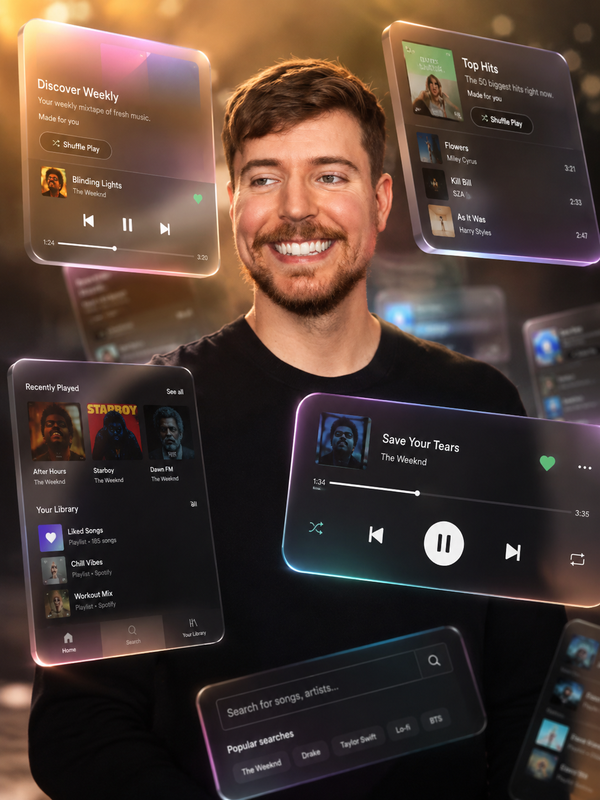
Create a cinematic, dreamlike AR visual featuring a photorealistic person at the center, surrounded by floating 3D music interface cards that orbit at varying depths. Some cards drift in the foreground partially obscuring the figure, while others float behind in soft focus. The cards display a translucent frosted glass aesthetic with glowing neon borders and smooth rounded edges. Use natural, warm lighting that enhances the photograph quality and creates a sense of depth. Include motion blur accents on the orbiting cards and a softly blurred background to emphasize focus on the central subject and the closest floating interface elements. The overall mood should feel immersive and ethereal, blending music streaming platform aesthetics with dimensional space.
Try this prompt in
How to Use This Prompt
Floating AR Music Interface Portrait is a ready-to-use AI image prompt designed for creative ai art who want consistent, high-quality results without spending hours on trial and error. A dreamlike AR portrait featuring floating translucent music interface cards with glowing neon borders surrounding the subject in a cinematic atmosphere.
Use this prompt whenever you need polished visuals for creative ai art workflows — typical moments include client work, content production, classroom prep, and rapid iteration on ideas. Copy the full prompt, paste it into your preferred AI tool, and replace any bracketed placeholders with your own specifics (topic, brand, subject, or constraints).
For best results, give the model a clear context line before pasting, keep your replacements concrete (numbers, names, examples), and regenerate 2–3 variations to pick the strongest composition. Pair it with the customization tips below to adapt it to your exact use case.
Example Output
Expect a sharp, well-composed image with clean subject framing, balanced lighting, and AR, Music Interface details suitable for direct use in social posts, thumbnails, or product mockups.
Prompt Details
Customization Tips
- Swap the subject for your own — replace the main noun with your product, character, or scene.
- Change the lighting (golden hour, studio softbox, neon night) to shift the mood.
- Add a specific camera or lens reference (e.g. "shot on 35mm, f/1.8") for a photo feel.
- Lock the aspect ratio to match your platform (9:16 for Reels, 16:9 for YouTube).
- Add or remove a style modifier like "cinematic", "minimalist", or "editorial".
- Specify a color palette in hex or named colors to match your brand.
- Append "no text, no watermark" to keep outputs clean.
- Use negative prompts (e.g. "no blur, no extra fingers") if your model supports them.
Frequently Asked Questions
What is the "Floating AR Music Interface Portrait" prompt used for?
A dreamlike AR portrait featuring floating translucent music interface cards with glowing neon borders surrounding the subject in a cinematic atmosphere.
Which AI models work best with this prompt?
It works across all major models, but you'll get the strongest results from Midjourney v6, Flux 1.1 Pro, GPT-4o Image.
Is this prompt free to use?
Yes. Every prompt on PromptCraft is free, requires no signup, and can be copied with one click for personal or commercial projects.
Can I use the generated image commercially?
Commercial rights depend on the AI image tool you use. Most paid tiers (Midjourney, Flux Pro, GPT-4o Image) grant commercial usage — check the model's current terms.
Why is my output different from the example?
AI models are non-deterministic — the same prompt produces variations each run. Regenerate 2–3 times and pick the strongest result, or refine with a short follow-up instruction.