'%20stroke='url(%23pc-grad)'%20stroke-width='3'%20stroke-linejoin='round'%20stroke-linecap='round'%20fill='none'%3e%3cpath%20d='M14%2012%20H46%20a8%208%200%200%201%208%208%20v14%20a8%208%200%200%201%20-8%208%20H36%20l-8%208%20v-8%20H14%20a8%208%200%200%201%20-8%20-8%20V20%20a8%208%200%200%201%208%20-8%20z'/%3e%3cpath%20d='M18%2022%20H42'%20/%3e%3cpath%20d='M18%2028%20H38'%20/%3e%3cpath%20d='M18%2034%20H34'%20/%3e%3c/g%3e%3cg%20fill='url(%23pc-grad)'%20filter='url(%23pc-glow)'%3e%3cpath%20d='M40%2038%20l10%2010%20-3%206%20-3%20-3%20-6%203%20z'%20opacity='0.95'/%3e%3ccircle%20cx='44'%20cy='49'%20r='1.5'%20fill='%230b0b14'/%3e%3c/g%3e%3c/svg%3e)
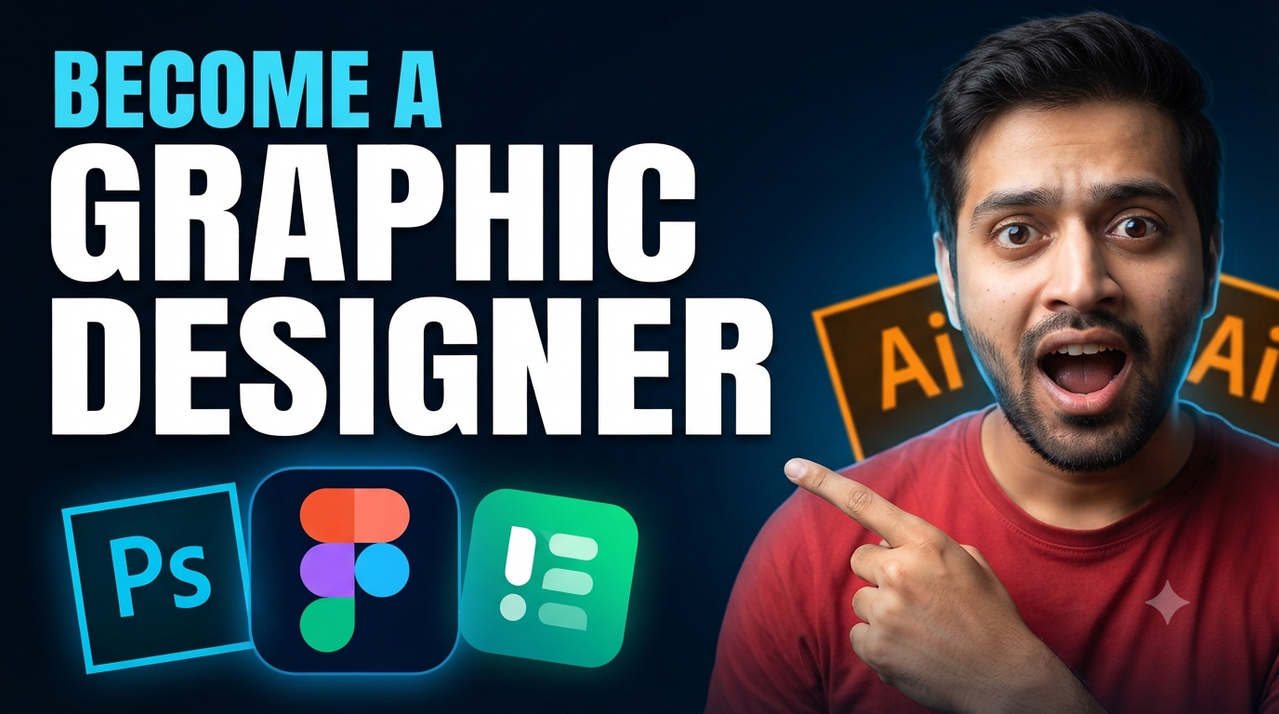
Become a Graphic Designer High-Converting YouTube Thumbnail Prompt
Create eye-catching design career YouTube thumbnails with this professional AI prompt featuring software icons and dark blue gradient backgrounds.
23rd
Form for Customization: To change the elements, simply edit the bracketed sections below.
Subject Replacement: [INSERT YOUR FACE / MAIN SUBJECT HERE]
Top Text (Blue): [INSERT TOP TEXT, e.g., BECOME A]
Bottom Text (White): [INSERT BOTTOM TEXT, e.g., GRAPHIC DESIGNER]
Software Icons: [INSERT SOFTWARE LOGOS, e.g., Ps, Figma, Ai]
Background Color: [INSERT BACKGROUND COLOR SCHEME, e.g., Blue to Dark gradient]
Detailed Prompt (Copy and Paste this block):
A high-converting, professional YouTube thumbnail with dramatic studio lighting and a high-contrast color palette. The overall composition and text placement perfectly mirror the reference image.
Subject: On the right side of the frame, replace the man with [INSERT YOUR FACE AND UPPER BODY HERE], making sure the new subject has an excited, open-mouthed expression and is pointing a finger towards the software icons on the left, wearing similar casual attire (e.g., a red t-shirt).
Text Elements (Crucial - Render with exact typography): All text is bold and sans-serif.
Top Left (Cyan/Light Blue Text): "[INSERT TOP TEXT, e.g., BECOME A]"
Middle Left (Large, Bold, White Text): "[INSERT BOTTOM TEXT, e.g., GRAPHIC DESIGNER]"
Software Icons: In the bottom-left corner, there is a cluster of three distinct, glowing software application icons:
A blue square icon with the white letters "Ps" (Photoshop).
A multi-colored (blue, pink, orange) oval icon (Figma).
A green icon with white abstract shapes (e.g., Elementor). Partially visible behind the subject on the right is a yellow/orange icon with "Ai" (Illustrator).
Style and Lighting: Cinematic and sharp, with strong backlighting and soft key lighting on the subject's face. The background is a dark, deep blue that fades to black. The focus is sharp on both the subject and the text. The aspect ratio is 16:9.
Try this prompt in
How to Use This Prompt
Become a Graphic Designer High-Converting YouTube Thumbnail Prompt is a ready-to-use AI text prompt designed for youtube-thumbnails-ai-art who want consistent, high-quality results without spending hours on trial and error. Create eye-catching design career YouTube thumbnails with this professional AI prompt featuring software icons and dark blue gradient backgrounds.
Use this prompt whenever you need reliable written output for youtube-thumbnails-ai-art workflows — typical moments include client work, content production, classroom prep, and rapid iteration on ideas. Copy the full prompt, paste it into your preferred AI tool, and replace any bracketed placeholders with your own specifics (topic, brand, subject, or constraints).
For best results, give the model a clear context line before pasting, keep your replacements concrete (numbers, names, examples), and ask a short follow-up to refine tone or length. Pair it with the customization tips below to adapt it to your exact use case.
Example Output
Expect a structured, ready-to-use response covering design career, youtube thumbnail, figma tutorial in a clear format you can paste straight into your workflow with only light edits.
Prompt Details
Customization Tips
- Replace placeholders with your actual design career details for sharper, on-brand output.
- Set a target length ("respond in ~150 words" or "in 5 bullet points").
- Specify the audience reading level (beginner, expert, executive).
- Ask for the output in a specific format — table, JSON, Markdown, email.
- Add a tone instruction: friendly, formal, witty, persuasive.
- Chain a follow-up: "now rewrite for LinkedIn" or "make it 30% shorter".
- Constrain with examples — paste 1–2 samples of the style you want to match.
- Add a "do not" list to block common mistakes (no emojis, no fluff, no disclaimers).
Frequently Asked Questions
What is the "Become a Graphic Designer High-Converting YouTube Thumbnail Prompt" prompt used for?
Create eye-catching design career YouTube thumbnails with this professional AI prompt featuring software icons and dark blue gradient backgrounds.
Which AI models work best with this prompt?
It works across all major models, but you'll get the strongest results from GPT-4o, Claude 3.5 Sonnet, Gemini 1.5 Pro.
Is this prompt free to use?
Yes. Every prompt on PromptCraft is free, requires no signup, and can be copied with one click for personal or commercial projects.
Can I edit the prompt?
Absolutely. Treat it as a starting template — swap in your topic, audience, and tone. See the customization tips above for proven tweaks.
Why is my output different from the example?
AI models are non-deterministic — the same prompt produces variations each run. Regenerate 2–3 times and pick the strongest result, or refine with a short follow-up instruction.